How to edit this HowTo
This HowTo is hosted on GitLab as the projects it is a guide of.
The first step is to clone the sources to your local PC.
We want to clone git-intro from https://gitlab.oeaw.ac.at/acdh-ch/wboe.
git clone https://gitlab.oeaw.ac.at/acdh-ch/wboe/git-intro
For a guide how to do this please refer to Getting some data for this workshop but for https://gitlab.oeaw.ac.at/acdh-ch/wboe/git-intro or Cloning a remote repository
Software prerequsites
You need nodejs 16.x (current LTS version at the time of writing) and yarn. The best way of installing this software varies depending on your OS:
After installing node on your system you can install the dependencies and run a local instance of the howto that updates the minute you save some changes in the extended Markdown documents that make up this howto:
yarn install
yarn run dev
Note: if those commands don’t seem to work please restart Visual Studio Code / VSCodium.
You find the texts you see in the howto in src/pages, the pictures are in public/assets/images
and if you need to add a new page to the navigation in the page header have a look in src\components\PageHeader.tsx.
Commiting your changes
This repository enforces a particular format for the commit messages. Please prefix your messages
either with fix: if you fixed a mistake or typo or feat: if you added something new.
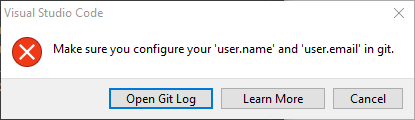
If you try without these you will not be able to commit sucessfully. You see a very similar error message to that of the first commit problem and the log, if you look at it, will tell you your options.
Publish your changes on the public website
About 5 to 10 minutes after you sync your changes with the gitlat.oeaw.ac.at server the public website is updated with your changes.
Please note that there are many checks in the process but the rule of thumb is that you passed all of them if everything is working locally. You have to fix all errors displayed before you can push your changes to the server or the website will not update.